
AI Music: Cover & Song Maker
Prodfire LLCMusic & Audio
3.4723.00 Reviews
- Version
- 2.8.1
- Installs
- 500.00K
- Age Rating
- Everyone
Screenshots

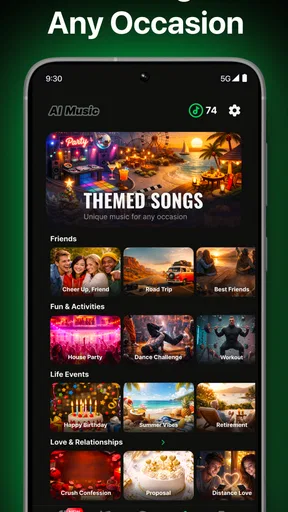
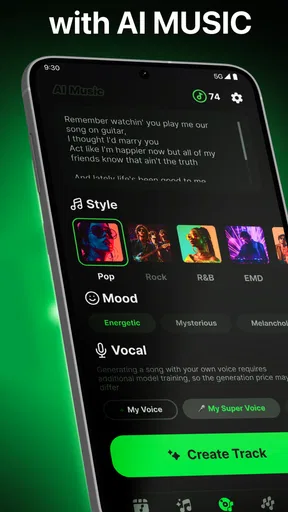
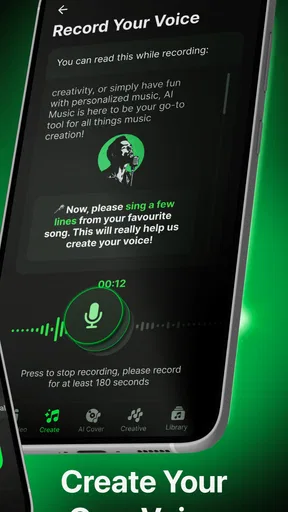
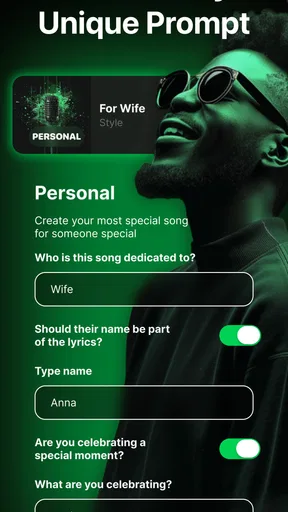
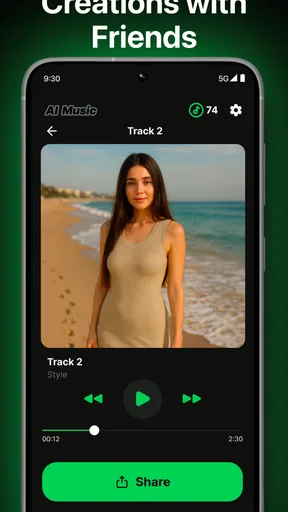
Our Review of AI Music: Cover & Song Maker
 Analysis by Appyee
When I want to turn a musical idea into something I can play for a friend, I don’t always want to open a full desktop production setup. That is the kind of starting point where AI Music: Cover & Song Maker makes sense: it is a music and audio app from Prodfire LLC built around AI-assisted song and cover creation. It is free to install, though in-app purchases range from $0.99 to $49.99 per item, so I would check the purchase details before treating every option as included.
From a rough idea to something shareable
I find the most useful way to approach this app is as a quick idea-to-draft tool, not a replacement for a recording studio. In this section, I focus on how a clear starting goal helps me assess what the AI changes and whether the result is ready to pass along. That also sets up the practical question of what happens when a draft leaves the app.
Start with a small, clear musical goal
I get more out of an AI music tool when I begin with a specific intention rather than expecting it to invent my taste for me. For example, I might want to test a different mood for a familiar musical idea, explore a new arrangement, or make a quick draft that gives a friend a sense of what I have in mind. That keeps the experiment focused and makes it easier to decide whether the result is worth refining.
That distinction matters because this is not the same kind of workflow as recording instruments into a traditional digital audio workstation. A full production app gives me detailed control over tracks, edits, and a recording process; an AI cover maker is more appealing when I want help generating or reshaping an idea without starting from a blank timeline. If I already know exactly how I want every instrument and vocal part to sound, a conventional studio tool may suit me better.
Give the app direction, then judge the result
The app’s central appeal is the chance to use AI as a creative starting point. I would treat suggestions as material to evaluate, not as a guarantee that the first result will match the sound in my head. A useful habit is to change one aspect of an idea at a time, such as its mood or genre, so I can hear what actually changed instead of losing track of why one version works better than another.
That approach is especially practical for someone who is not trained in music. You can listen for broad qualities—whether a version feels more energetic, relaxed, or suited to the occasion—without needing to describe a complex arrangement in technical language. The trade-off is that AI-generated choices can feel less deliberate than decisions made by a musician who knows the song and can shape each part by hand.
A realistic use: making a quick shareable draft
Imagine I have a song idea in mind while commuting, but I am not carrying recording gear and do not want to spend the evening learning a full production program. I can use a phone-based creation workflow to explore a cover-style direction, compare the feel of the output with my original idea, and decide whether it is something I want to share casually or develop elsewhere. That is a more realistic expectation than treating a quick AI result as a finished commercial release.
Before sending anything to a group chat or posting it publicly, I would listen through the entire result rather than judging it from the first few seconds. I would also make sure the version I share is the one I intended, especially if I have been trying multiple directions. The handoff is part of the creative process: the app can help produce a draft, but I still need to decide how it represents my idea and where it belongs next.
People often wonder whether they need musical experience to get started. I don’t think that should be a barrier to experimenting with this kind of app; it is most approachable when you are curious and willing to listen critically. But if you need precise control over every note, or you are preparing a polished track for a serious production, I would use a dedicated music workstation and treat an AI-generated version as inspiration rather than the final deliverable.
Where it fits among music-making options
Compared with a conventional recording app, an AI cover tool puts more emphasis on generating or transforming an idea than on manually building a track piece by piece. Compared with simply listening to music, it gives you a way to participate in making something. That middle ground is useful for casual creators, curious listeners, and people who want a quick creative prompt; it is not automatically the best route for musicians who want detailed editing or predictable, repeatable results.
I would also keep the intended audience in mind. The app is rated for Everyone, and its low barrier to experimentation may appeal to a wide range of ages, but a younger user should still have a parent or guardian handle purchase decisions. The free download is a low-commitment way to see whether the workflow suits you; the available in-app purchases mean I would avoid assuming that every creation choice or extra is free.
What to check before sharing or spending
A useful non-obvious habit is to separate the creative test from the final handoff. First, make a version for your own listening and decide what you like about it. Then, if the app offers a way to share that result, consider whether it is appropriate for the audience and platform you have in mind. I would not assume that an AI-made cover is automatically cleared for every public or commercial use; when rights matter, check the relevant rules for the source material and destination before posting.
Another trade-off is convenience versus control. An AI can help get a sketch moving, but its choices may not line up with a specific performance or arrangement in your head. If you find yourself repeatedly trying to force the result toward an exact sound, that is a sign to switch tools or bring the draft to a musician who can make targeted edits. The app is most useful when its unpredictability is part of the fun, not when you need it to behave like a precise editing suite.
Getting Started with AI Music
First things first, downloading and setting up AI Music: Cover & Song Maker is a breeze. It’s available on both Android and iOS, so you can find it easily on Google Play or the App Store. Once installed, you’re greeted with a sleek and intuitive interface. Seriously, even if you’ve never touched a music app before, you’ll feel right at home here.
Exploring the Features
Now, the real magic happens when you dive into the features. The app offers a range of tools, from creating your own songs to making covers of existing ones. And it’s all powered by AI. The AI takes your input and helps create harmonies, melodies, and even suggests lyrics. I’ll admit, I was a bit skeptical about how good the AI could be, but I was pleasantly surprised.
One of the coolest features is the cover maker. You can take any song and put your own spin on it. The AI helps in adjusting the tempo, pitch, and even suggests alternative arrangements. It’s like having a music producer with you 24/7.
User-Friendly Interface
Let’s talk about the interface for a second. It’s designed in a way that makes you feel like a pro. The layout is simple, yet robust enough to handle complex tasks. You can easily navigate through different sections and find exactly what you’re looking for without getting lost in a sea of options. Plus, the app provides tutorials and tips, which are super helpful if you’re new to music creation.
Personalizing Your Music
Customization is key, and this app does not disappoint. You can tweak almost everything. Whether it’s the genre, mood, or instruments used, the app lets you play around until you get the sound you want. The AI learns from your preferences, so the more you use it, the better it gets at predicting what you like.
I found myself spending hours just experimenting with different combinations. It’s addictive in the best way possible. And the best part? You don’t need any prior musical knowledge to create something amazing.
Sharing Your Creations
Once you’ve crafted your masterpiece, sharing it is as easy as pie. The app allows you to directly upload your creations to social media platforms or share them with friends and family. It’s a great way to showcase your talent and get feedback from others.
Plus, there’s a community feature where you can explore what others are creating with the app. It’s inspiring to see the variety of music being produced and shared.
Final Thoughts
In a nutshell, AI Music: Cover & Song Maker is a fantastic tool for anyone interested in music creation, whether you’re a seasoned artist or a complete newbie. It combines the power of AI with user-friendly design, making music creation accessible and fun for everyone.
The audience response is mixed rather than unanimous: the app has an average rating of 3.4 from around 12 thousand ratings, alongside about 610 written reviews. That does not tell me whether a particular creation will work for you, but it is a useful reminder to try the basic workflow yourself before paying for extras. It has passed 500 thousand installs, and its current version is 2.1.1; it was released on October 15, 2024. For an app that is still a relatively focused creative tool, I would judge it by whether its output fits my purpose, not by its popularity alone.
If you’ve ever wanted to dive into the world of music production, this app is a great place to start. So go ahead, give it a try, and unleash your inner musician!
Verdict
Strengths of AI Music: Cover & Song Maker
- Easy-to-use interface for quick music creation.
- Wide range of instruments and sound effects.
- Supports exporting tracks in various formats.
- Regular updates with new features.
- Great community for sharing and feedback.
Limitations of AI Music: Cover & Song Maker
- Limited free version features.
- Occasional app crashes reported.
- Some features require in-app purchases.
- Learning curve for advanced tools.
- Requires internet for full functionality.
Similar Picks in This Category
View All
YouTube Music
Google LLC4.4

Samsung Music
Samsung Electronics Co., Ltd.3.8

Spotify: Music and Podcasts
Spotify AB4.3

JioSaavn - Music & Podcasts
Saavn Media Limited4.3

Lark Player:Music Player & MP3
Lark Player Studio - Music, MP3 & Video Player4.6

StarMaker: Sing Karaoke Songs
SKYWORK AI PTE. LTD.4.3
Frequently Asked Questions
What is AI Music: Cover & Song Maker?
AI Music: Cover & Song Maker is a versatile app that allows users to create music covers and original songs using AI technology. It offers various tools and features to enhance your musical creativity, perfect for both beginners and seasoned musicians looking to experiment with new sounds.
How easy is it to use AI Music: Cover & Song Maker?
The app is designed with user-friendliness in mind. It offers an intuitive interface with guided tutorials, making it accessible for users of all skill levels. Whether you're a novice or an experienced musician, you'll find the tools and features easy to navigate and use effectively.
What features are included in AI Music: Cover & Song Maker?
AI Music: Cover & Song Maker includes features such as AI-generated melodies, customizable instruments, and a wide range of effects to enhance your music. It also supports multi-track editing and offers export options in various formats, making it a comprehensive tool for music creation.
Is AI Music: Cover & Song Maker free to use?
The app offers a free version with basic features, but premium features require a subscription or one-time purchase. Subscribing unlocks additional instruments, effects, and advanced editing tools, providing a more robust experience for dedicated users.
Can I share my creations from AI Music: Cover & Song Maker?
Yes, the app allows you to share your music creations directly to social media platforms or export them to your device. This makes it easy to showcase your work to friends, family, or a broader audience, enhancing your music-sharing experience.
